Sponsors – Meeting booking system 

June 17, 2024

Changelog

We are excited to announce a new feature designed to enhance sponsor engagement and streamline meeting coordination: the Sponsor Meeting Booking System. This innovative tool will allow sponsors to manage their meetings effortlessly within their dedicated sponsor pages. 

Organizers can create and assign meeting slots for each sponsor. This ensures that sponsors have designated times and locations for their engagements, enhancing scheduling efficiency. 

From their sponsor pages, representatives can manage meeting requests with ease. They can approve, decline, or propose new meeting times, giving them control over their schedules. All confirmed and pending meetings are conveniently viewable under the “Team meetings” section in the sponsor zone backend. 

cl4

To ensure timely communication, sponsor representatives will receive email notifications whenever an attendee sends a meeting request. This feature helps in maintaining prompt responses and fostering better interactions between sponsors and attendees. 

1. Setting Up Meetings: Organizers set up meeting slots and locations tailored to each sponsor. 
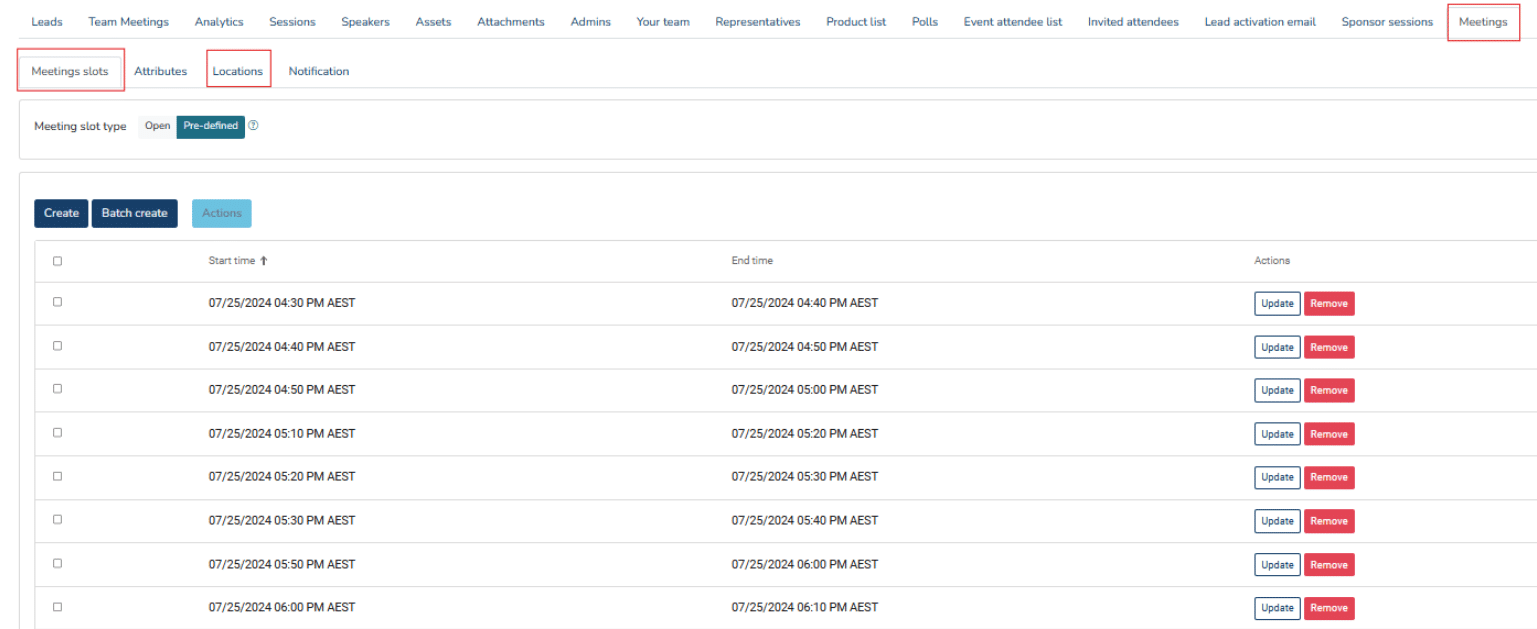
cl5.1

2. Managing Requests: Sponsor representatives handle meeting requests directly from their sponsor page.

cl5.2

3. Visibility and Notifications: All meetings are tracked in the backend, with email alerts for new requests. 

cl5.3

This new feature aims to provide a seamless experience for both sponsors and organizers, ensuring that all meetings are efficiently managed and scheduled. We believe this will enhance the value sponsors receive from their participation. 


Please check out the full change log below, and the list below that for upcoming changes headed your way!

Full change log

New Features
  • Sponsor Meetings – Request form & Sponsor POV

  • Sponsor Meeting – location tab

  • Sponsor Meetings booking system

  • Add Arabic translation 

Enhancement/Update
  • Sponsor sessions – Convert sorting from arrows to drag and drop  

  • Sponsors – Ability to delete captured leads

  • Add scrutiny settings  

  • Registration – Add toggle to show date/time for session attribute

  • New custom attribute: session attributes  

  • Sponsors – Add a hide sponsor logo toggle in Console  

  • Forum UI changes  

  • Sponsor meeting – Attribute added on Sponsor Meeting form not reflecting on booking

  • Add nickname to Update Profile page  

  • Hide networking feature toggles for attendees in scrutiny  

  • Hide networking toggles for attendee in scrutiny

  • Use of default filters in My Agenda page

  • Add a hide sponsor logo toggle in Console  

  • No marked as completed icon beside a completed chat on session help chat

  • Ability to copy the On-site control panel check-in URL  

  • Add footer in all reg pages

  • Campaign tool – Ability to pull basic hotel attributes into campaign tool

  • Flights – add invite code on flight export

  • Nomination – ability to select what data points are displayed in table

  • Standardize import template, export, and reports file name convention  

  • To Lower registration email address (ticket, manual, import)  

Bugfixes
  • Fix inactive attendees receiving campaign mail  

  • “Mandatory” is showing for non-mandatory attendees  

  • Actioning an onsite meeting from sidebar My Agenda encounters an error  

  • Attendee list not working properly

  • Disabled attributes info are still showing in app attendee profile  

  • Error encountered on notifications list  

  • Links on the session description not readable  

  • Whitelisting domain/email in nomination not working with nomination attributes

  • Wrong journey when navigating away from a newly created chat  

  • Badge scanner sponsor lead error message

  • Production build of the app fails  

  • Some android users unable to download from resource center  

  • Cannot save attendee data  

  • Disabled attendee is not validated during login and misleading registration validation  

  • Email confirmation – user unable to upload attachment  

  • Hotels – Unable to add an attendee directly on to Hotel tab  

  • Masked attribute is masking placeholder text on display

  • Masking not working in app  

  • Meeting slot settings is being shared by all sponsor  

  • New line character ‘\n’ is displayed in data exports for multi-line text  

  • Nomination attributes not pulling over attendee profile  

  • Nomination date format issues

  • Notification inconsistency in delivery

  • Random characters on Attendee Export  

  • Session attendee date added is incorrect

  • Show in attendee profile status linked to basic attribute visibility

  • Wrong subscription plan appearing in all users export, add status also