
Resources
Blog
Insights on events, technology, and the future of gathering
Latest articles
Insights on events, technology, and the future of gathering
Quick answer: The Canapii green room is a private backstage area for virtual and hybrid events where speakers, moderators and organizers meet before going live. Built around the live stage and holding rooms, it lets teams run tech checks, queue speakers, chat privately and control the broadcast without the audience seeing any of it.
In Canapii’s quiver of new features, we present to you the green room: a dedicated area for speakers to connect and engage prior to being broadcast live on a virtual stage.
Think of this space as the backstage - the ‘behind the curtains’ area you would have at any in-person event. Speakers, moderators, and event organizers can all meet and interact in this virtual room as they prepare to go live!
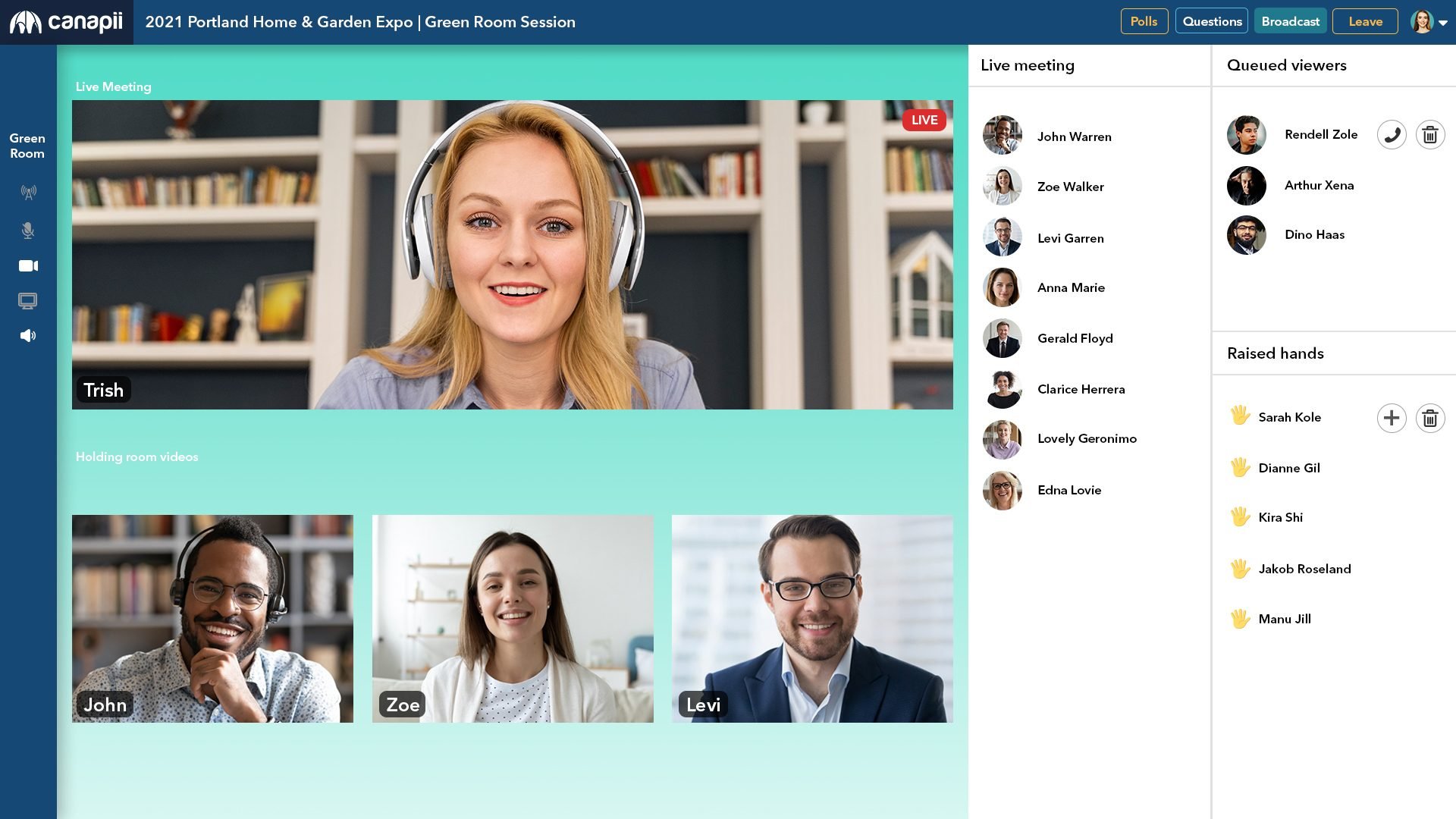
The Canapii green room is a virtual backstage created around the live stage and the holding rooms. The holding rooms allow your speakers and audience to join the room without being automatically broadcast to everyone else, so people can arrive, get ready and wait for their cue in private.
The green room combines a live RTMP stage, holding rooms and private chat, so a green room administrator controls exactly who is on the broadcast at any moment.
Going live in the RTMP stream means you can share your screen, play videos, and share your audio or camera at the same time. You can also allow for multiple moderators by adjusting admin access in the Console itself - the admin permissions carry over, so all you need is admin access for the event to moderate. That way, one speaker can give their presentation while a colleague helps out with the slides. To learn more about RTMP streaming and decide whether it’s right for your event,
Click the “Raise hand” option to alert the green room administrator that you have a comment you’d like to add. The administrator can chat privately with you or simply add you to the broadcast. Once you’ve asked your question, you can be moved back to the holding room so you aren’t broadcasting to the whole room - this cuts down on the bandwidth strain on your network and allows for a dynamic webinar-style round table discussion without a lot of extra camera feeds and noise distractions.
Unashamedly, WhatsApp was our inspiration for the private chat within the green room! The vast majority of people already use WhatsApp, so no instructions or guidance should be needed - it’s familiar, quick, and an efficient way to communicate. An administrator can also call individual audience members in the holding room directly: they can toggle their media options for each room, enabling a private conversation while muting their feed in the main room. That way, you can check in with your speakers before they go live, talk privately with your moderation team, give last-minute reminders, and more.
Test your speakers’ cameras and microphones in a private one-on-one chat before putting them in front of your audience. Any glitch gets caught and fixed backstage, not on the live broadcast.
The last thing you want is all of your speakers appearing at once, speaking over each other or simply waiting for their turn to present. With the green room, you can add an element of surprise and create a seamless keynote session, promoting speakers to the live broadcast and pulling them back into the holding room as needed. It also lets an event manager control the workflow leading up to a live session - all the better for your broadcast.
Enough of the world-renowned phrase ‘Next slide please’. By bringing in the admin team, you can ensure a continuous flow and take cues to advance slides or play videos. Your speakers can also share their screen, their slides, and their audio - all at the same time.
Your speakers need to feel confident and ready to present on stage. In the green room you can interact with them directly without the audience being aware of what is happening behind the scenes. Any last-minute additions to the script, or a word or two to change based on what the previous presenter mentioned? This is the place to anticipate such changes.
The green room is included in our Motivator, Driver, and Professional plans. For more information, you can reach out directly to our team of event experts.
A virtual green room is the online equivalent of an event’s backstage: a private space where speakers, moderators and organizers gather, prepare and communicate before being broadcast live to the audience.
No. The holding rooms let speakers and audience members join without being automatically broadcast, and private chats stay between the administrator and the participant. Only people promoted to the live stage appear on the broadcast.
You can allow multiple moderators by adjusting admin access in the Console - event admin permissions carry over to the green room, so anyone with admin access for the event can moderate.
Yes. Going live in the RTMP stream lets a speaker share their screen, play videos, and share their audio or camera at the same time, while a colleague or admin advances the slides.
Want to see the green room at work before your next virtual or hybrid event? Our team of event experts, backed by 24/7 support, would love to show you around - contact us to schedule a live demo.